Over the years SSDs have become the default choice for primary storage and for good reason. They’re fairly quicker, convenient, and far more power-efficient than your average hard drive. Once you move your files to an SSD and tuck it away, it feels like they’re safe for years.
But that assumption hides an uncomfortable truth.
An SSD when left unpowered for prolonged durations, loses bits of data over time and might leave you with corrupted, incomplete, or missing files. This is the reason why many people still avoid relying on SSDs for archival storage and instead opt for hard drives, magnetic tape, or M-Disc when they need something that can sit on a shelf without worry.
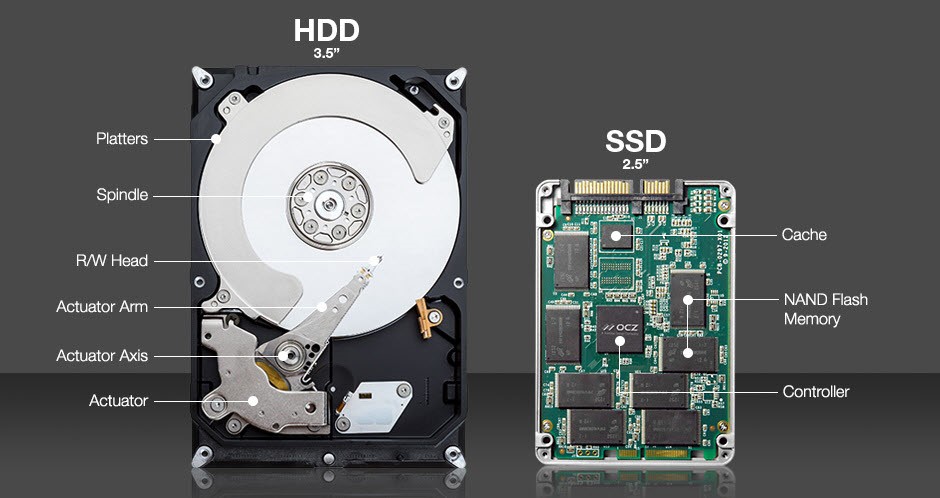
Your SSD Data Won’t Last Forever
Non-volatile, just not endlessly so
While hard drives magnetize tiny sections of spinning platters to store information, SSDs, on the other hand, shift the electrical charge inside NAND flash cells to represent binary data. These cells can hold their state without power, hence the “non-volatile” label, but the length of time they can do so is the real catch.
Since most consumer drives today use either TLC or QLC, letting an SSD sit untouched for more than a year or two quietly increases the risk of data drift. QLC has certainly matured, so a 2–3-year unpowered window is a more practical expectation but anything beyond that invites voltage decay in the cells, which can leave you with partial data or a drive that refuses to mount at all.
| NAND Type | Typical Shelf Life (Unpowered) | Notes |
| QLC | 1–3 years | Lowest endurance, faster voltage decay |
| TLC | ~3 years | Most consumer SSDs |
| MLC | ~5 years | Rare in modern consumer drives |
| SLC | ~10 years | Industrial-grade, expensive |
Temperature & Wear: The Two Major Factors
However, these limitations aren’t set in stone and depend heavily on two important factors: temperature and wear.
According to JEDEC standards (JESD218A), heat is the enemy of data retention.
| Storage Temperature | Typical Shelf Life (Unpowered) |
| 40°C (Hot Room) | Can shrink 1–3 years to months |
| 20°C (Cool Room) | Can extend retention by 2× to 3× |
Further, the health of the drive matters. A brand new SSD holds its charge much better than the one that has been written to thousands of times. The retention estimates usually apply to drives that have already reached their write endurance limits (TBW), meaning a newer drive will likely last longer on the shelf than an old workhorse.
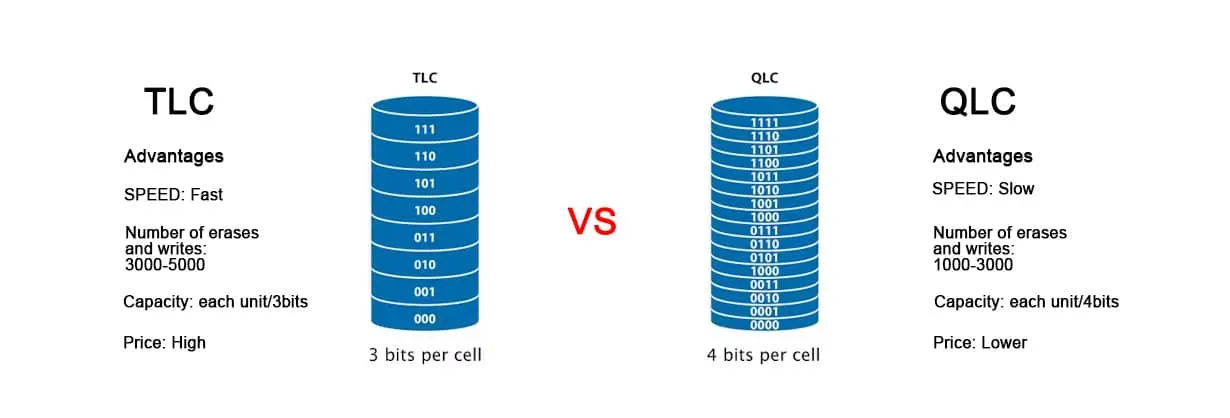
Why Unpowered SSDs Fail
This happens because SSDs are designed to be active. When powered on, the drive’s controller works constantly in the background to catch bit errors (ECC) and ‘refresh’ weak cells before they fail. When the drive sits in a drawer, that maintenance stops. Without the controller there to scrub the data, minor voltage drops eventually turn into permanent corruption.
Why SSDs Aren’t Ideal for Deep Archival Storage
That’s why SSDs aren’t ideal for deep archival storage, especially for creators, researchers, or anyone sitting on large, irreplaceable projects. Hard drives aren’t perfect either, they can rot a bit due to mechanical aging, but they handle long stretches without power far better. By any chance, if you haven’t revisited your offline archives lately, now’s a good time to make sure everything’s still intact.
But You Don’t Need to Lose Sleep Over It
Very few people actually store data in long-term, offline archives
The scenario above really applies only to enterprise setups, hardware enthusiasts, and solo creators managing huge archives. Most people never deal with stacks of drives sitting unplugged for years. A regular user normally has one or two SSDs in their PC and they rarely stay without power for more than a few weeks or months at most.
If you’ve ever lost data on an SSD, it was likely due to a rogue power surge or a failing drive, not slow voltage drift. That said, factors like heat and the quality of the NAND can speed up that loss when it does happen.
And SSDs aren’t immortal, even when they’re powered continuously. NAND flash has a finite number of write cycles, but the average user will retire or upgrade their drive long before they hit that limit. So you don’t need to obsess over write endurance or worry about leaving your system powered down for a while.
Just avoid putting blind faith in an SSD that’s been sitting unpowered for years at the back of a drawer. Which leads neatly to the next point.
A Backup Isn’t Optional
It’s always smarter to avoid disaster than scramble to fix it
Backing up your data is the most straightforward way to sidestep the inherent limits of any storage medium. Keeping multiple copies across different types of drives ensures that a sudden mishap doesn’t wipe out something irreplaceable. That’s the whole idea behind the 3-2-1 backup strategy: maintain three copies of your data, store them on at least two different kinds of media, and keep one of those copies off-site..
For most people, that setup is easily covered by their main PC, a NAS or external drive, and a cloud service. Redundancy is the quiet insurance policy that keeps your data safe.
Whether you’re dealing with the finite lifespan of NAND flash, the occasional power-related scare, or the natural data retention limits of SSDs, a solid backup strategy removes the anxiety. SSDs may not be ideal for cold storage, but even hard drives aren’t infallible, relying on a single copy of anything is an accident waiting to happen. At some point, every user experiences a drive failure, which makes a dependable backup system less of a luxury and more of a necessity if your data truly matters.
When Your Backup Isn’t as Bulletproof
Redundancy helps but even the most careful routines fail
Redundancy dramatically lowers your risks, but it doesn’t completely erase them. Drives age, cloud sync misfires, folders get overwritten, and sometimes you only realize something’s missing after the backup has already cycled through. Even the most careful users eventually bump into a moment where a file was deleted weeks ago, a partition went bad, or an external drive decided to give up without warning.
One important distinction to make is between data that decays and data you delete. If you manually delete files on a modern SSD, the TRIM command usually wipes those blocks almost instantly to maintain speed, making recovery difficult. But for data lost to partition corruption or silent retention errors, it often remains physically present on the chips, just inaccessible to the operating system.
That’s where Stellar Data Recovery Professional comes to your rescue. A good utility doesn’t replace backups, it steps in when your safety net slips, quietly helping you reconstruct files, recover lost partitions, or pull data out of a drive that refuses to mount. Stellar Data Recovery Professional is built exactly for these edge cases: the rare, inconvenient moments when everything else has gone right but your data still needs rescuing.


Rishabh is a senior content specialist at Stellar Information Technology, where he writes about comprehensive data care solutions.

 6 min read